



Mobile apps for the people who do the work away from a desk.
What happens when your driver loses signal, or your technician needs an answer at the customer’s door? We build apps for the people who work away from a desk. One app covers iPhone and Android, it keeps working offline, and it’s published under your company’s name. Most take 6 to 20 weeks.
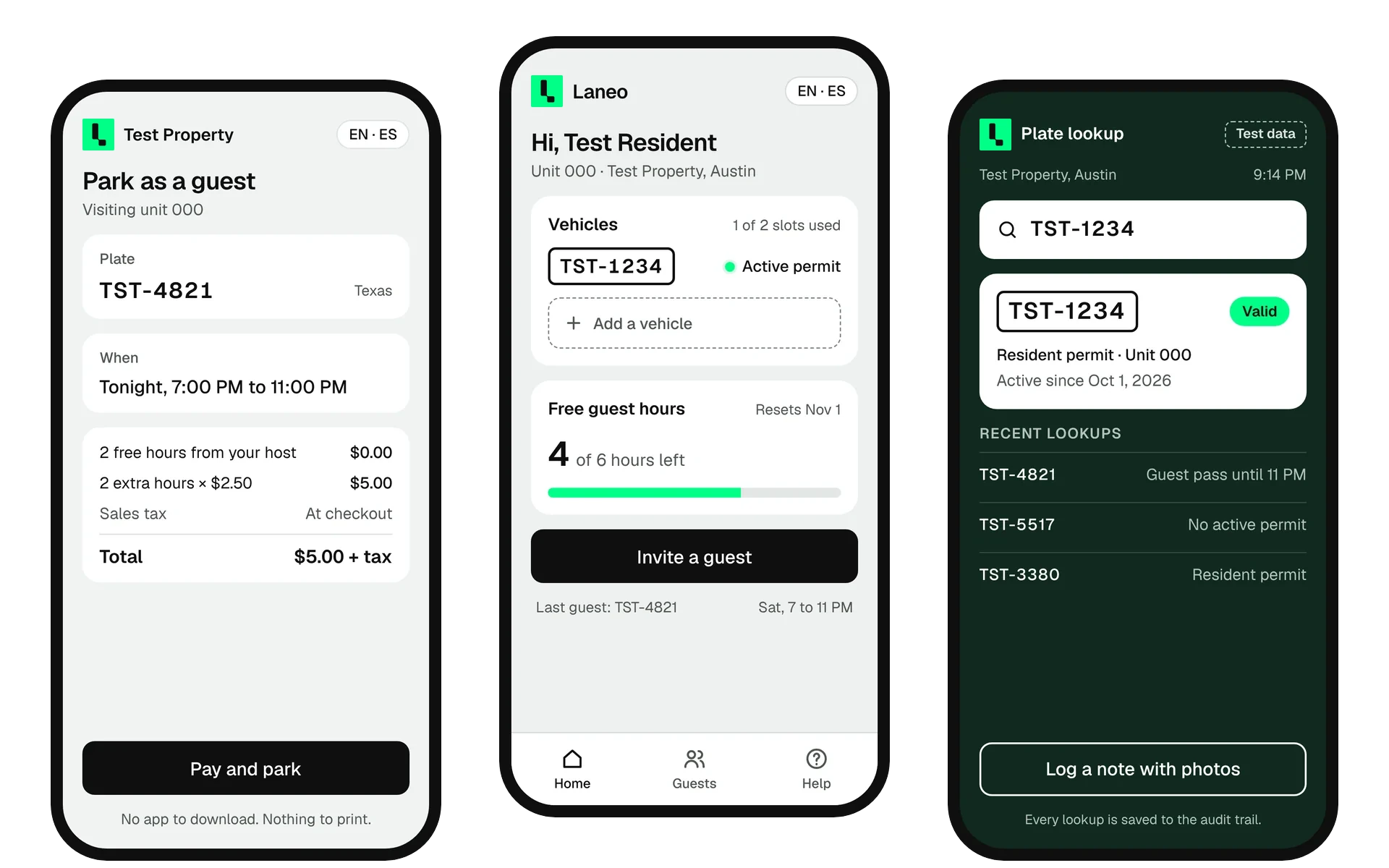
Most of these are the mobile half of something you already run. A few stand on their own.
Job lists, checklists, photos, signatures, parts used. Records the visit where it happens and syncs when the van has signal again.
Works offline, with the camera and GPSStops in order, navigation handoff, proof of delivery, exceptions with a photo. Dispatch sees each event the moment it happens.
With maps, barcode scanning and live trackingBookings, payments, messaging, loyalty, documents. A reason to keep the app installed after the first week.
With push notifications, payments and a store listingShifts, time and attendance, approvals, announcements. For the staff who never open a laptop.
Company login, push notifications and kiosk modeThe mobile half of the portal or platform you already run. Same login, same data, screens cut down to what matters on a phone.
Same API, same loginIf it needs to work offline, use the camera or barcode scanner constantly, or send push notifications, it’s an app. Otherwise it’s probably not. Product Discovery settles it before anyone estimates.
See Product DiscoveryWork like this.
Buy the app when the job is standard. Build when the job is yours.
Half the time, a website that works well on a phone is enough. When it is, we’ll say so.
Choose it when your field or delivery process matches the vendor’s. Generic checklists, standard proof of delivery, no integration beyond CSV.
Watch for: Per-seat pricing as the team grows, and the form that can’t capture the thing your customer actually asks for.
Choose it when users always have signal, work in short sessions, and nobody needs the camera or push notifications. Often the right first step.
Watch for: Slow on the warehouse floor, no offline, no barcode scanning worth the name. If people start asking for “the app”, listen.
Choose it when the work happens where signal is poor, the phone is the tool for the whole shift, and it must talk to your dispatch, WMS or CRM.
What you get: A price agreed before we start, one codebase for both stores, an API your web application shares, and store accounts in your name.
A build on your phone in week two. Ten devices in the field by week nine.
An example 12-week build, about the size of a field or driver app.
- Week 0 Product Discovery
The shift mapped, the offline moments listed, the data model sketched, the backlog estimated. You get a price we’ll hold and a sprint plan.
- Weeks 1 to 2 · Sprint 1 Foundations
Store accounts in your name, hosting set up. Code repositories, automated checks, UnflowID sign-in, the data model and the first two screens. Demo one: you sign in on your own phone through TestFlight, Apple’s test app.
- Weeks 3 to 8 · Sprints 2 to 4 The core flow, offline
The one job the app exists for, end to end, with the offline layer and sync. Your process owner runs it in the field each sprint.
- Weeks 9 to 10 · Sprint 5 Pilot devices
Ten real users, real routes or jobs, alongside the old way. Push notifications, admin screens and reporting land while they use it.
- Weeks 11 to 12 · Sprint 6 Store launch and handover
Pilot feedback fixed, store listings written, review passed. Documentation, a security review with IT, every credential handed over.
Week one goes on building, not deciding.
By the end of sprint one, the app’s on your phone. Here’s what it’s made of.
Forwarding this to your IT lead? Send them the one-page security summary
TypeScript, one codebase for iOS and Android
App
What your people hold. One codebase for both platforms, native components underneath, UnflowUI so sprint one has real lists, forms and scanners. Native Swift or Kotlin modules only where the hardware demands it.
Local-first writes, conflict rules agreed in Product Discovery
Offline layer
Every action is saved on the device first and queued. When signal returns it syncs in order. Conflicts are resolved by rules you agreed, not by whoever saved last.
Same backend as your web application, push via APNs and FCM
API
Rules live in one place. If you already have a web application from us, the app plugs into it. If not, we build the API once and the web screens later share it.
Biometric unlock, device roles, remote sign-out
Identity
Staff sign in with Google or Microsoft once and unlock with Face ID after. A lost phone is signed out from the admin screen. Every record carries who captured it and where.
Your developer accounts, over-the-air fixes
Distribution
Both store accounts opened in your company’s name. TestFlight and internal testing for the pilot group. Bug fixes ship over the air the same day; store review only for native changes.
What we’d turn down.
A studio that builds everything isn’t telling you the truth about something.
- A website in an app wrapper If the content is a marketing site, users want the site. Stores reject wrappers and users delete them. We’ll build the web version instead.
- Rescue of an existing app without discovery We’ll take over an app someone else built, but not blind. A Product Discovery on the codebase first, so the estimate is honest and you know whether to repair or replace.
- Games Native games need a different stack, a different team and a different kind of studio.
Questions buyers ask first.
Do we get both iOS and Android?
Yes, from one codebase, at the same time. We don’t build one platform first unless your users are genuinely on one platform, which is rarer than it sounds.
Why React Native and not Flutter or native?
Our web applications are TypeScript and React, so the same engineers build both and share the API layer. Flutter is a good framework with a smaller hiring pool for you later. Fully native means two codebases and two teams; we reserve it for hardware-heavy work.
Do we need Apple and Google developer accounts?
Yes, in your company’s name. We open them with you in sprint one. Apple charges $99 a year, Google a one-off $25. Your app is published by you, not by us.
How does offline actually work?
Every action is saved on the device first. A sync queue sends it when signal returns, in order. If two people changed the same record, the rule agreed in Product Discovery decides, and the loser is kept in the history rather than lost.
How do updates reach users?
Bug fixes and most screen changes ship over the air the same day. Changes to native code go through store review, usually one to two days. We batch those.
Can staff use their own phones?
Yes. UnflowID handles sign-in, biometric unlock and remote sign-out, so a lost personal phone is a settings change, not an incident. Rugged devices for the warehouse if you prefer; we can recommend models.