





The application your business runs on, built to your process.
Still running the business on spreadsheets and a Friday status email? We build the applications that let your team work the way they want to work. You’ll see it working every two to three weeks, and most take 6 to 30 weeks.
Find the one that sounds like your Monday. Most projects turn out to be two of them at once.
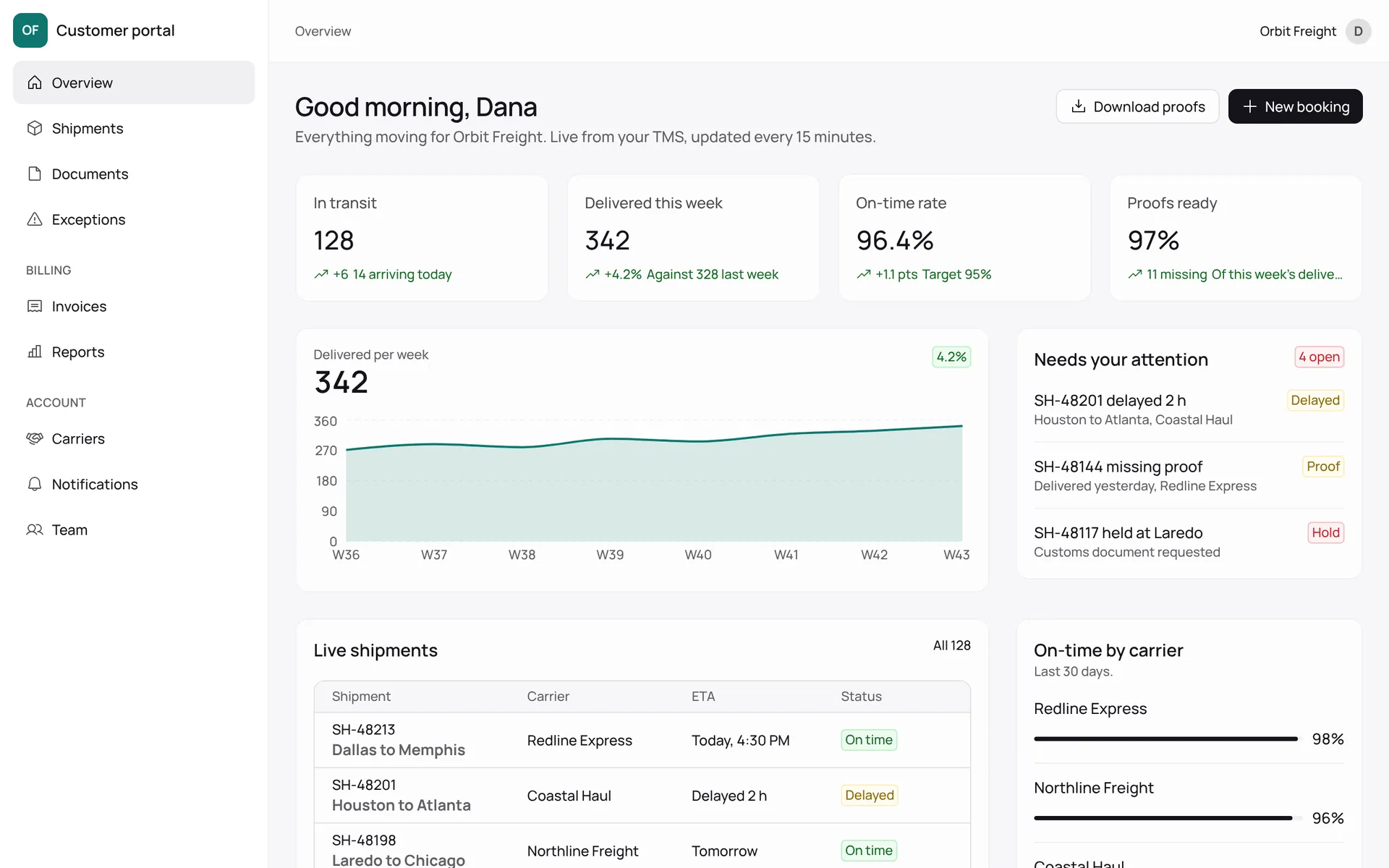
Your customers log in to see orders, shipments, documents, invoices and tickets, and to act on them. Replaces the status email and half the inbound calls.
Reads from your ERP, TMS or CRMThe system your team works in all day: receiving, scheduling, dispatch, inventory, approvals. A warehouse or transport management system built for how you actually move things.
Often replaces a spreadsheet and a legacy toolMulti-vendor catalogs, carts, checkout, seller onboarding and payouts. When Shopify is the wrong shape because the pricing, the sellers or the fulfillment aren’t standard.
With Stripe Connect, search and catalog importsRole-based access, audit trails, bulk edits, exports, reporting. The screens finance and operations need behind the customer-facing product. Boring on purpose, correct always.
Usually alongside one of the aboveThe workbook that runs the company, rebuilt as an application with validation, permissions, history and one version that’s always the current one. Small in scope, large in relief.
The most common first projectProduct Discovery settles the shape before anyone estimates it. The fee comes off a build that starts within 30 days of the workshop.
See Product DiscoveryWork like this.
Logistics
A customer portal that replaced the weekly status email.
Consulting
A custom AI-powered internal tool that changed how a client’s operations ran.
Buy when your process is standard. Build when it’s the business.
If something off the shelf would do the job, we’ll tell you, and you’ll save the build.
Choose it when your process matches how 80% of companies do it. Accounting, payroll, email, CRM for a simple pipeline. The vendor’s roadmap is your roadmap and that’s fine.
Watch for: The 20% it doesn’t do becoming a person, a spreadsheet and a Friday afternoon.
Choose it when you need an internal form or a prototype this week, few users, no integrations, and you’ll accept throwing it away.
Watch for: Per-seat pricing as it spreads, the rule it can’t express, and no way to export the logic when you outgrow it. We don’t build or maintain these.
Choose it when the process is what makes you better than competitors, it touches customers or money, it needs to talk to two or more systems, and 20 or more people depend on it.
What you get: A price agreed before we start that brings you value, a named PM, and a demo every two to three weeks.
Working software from week two or three. Internal testing from week eight.
An example 12-week build, about the size of a customer portal.
- Week 0 Product Discovery
Process mapped, data model sketched, backlog written and estimated. You get a price we’ll hold and a sprint plan.
- Weeks 1 to 2 · Sprint 1 Foundations
Hosting accounts opened. Code repositories, automated checks, hosting, UnflowID sign-in, the database design and the first two screens. Demo one: you log in.
- Weeks 3 to 8 · Sprints 2 to 4 The core flow
The one process the application exists for, end to end, then the integrations it depends on. Your process owner tests each sprint on a preview URL.
- Weeks 8 to 10 · Sprint 5 Pilot group
Five to ten real users on real data alongside the old way. Reporting, exports and the admin screens land while they use it.
- Weeks 11 to 12 · Sprint 6 Launch and handover
Pilot feedback fixed, the old way switched off, documentation written. Security review with your IT lead, every credential handed over.
Nothing gets invented on your budget.
We build every application on the same five parts, so from sprint two we’re working on the proposed solution.
Forwarding this to your IT lead? Send them the one-page security summary
React, TypeScript, server components
Frontend
What your users see. Screens built from UnflowUI, our component library, so sprint one has real tables, forms and navigation instead of gray boxes. Responsive from the start, so your tablet and phone work too.
TypeScript, REST, OpenAPI, background jobs
API
Where the rules live: who may do what, what happens when an order changes, which systems get told. Documented endpoints so your integrations, a future mobile app or your own team can build against it.
Migrations, branching, point-in-time restore
Data
One relational database with a schema we agree in Product Discovery and version in code. Each sprint gets its own branch of your data for testing, and a restore to any minute of the last week.
SSO, roles, invitations, audit log
Identity
Sign-in, roles and permissions, ready in sprint one. Your staff use Google or Microsoft; customers and partners get invited. Every action carries who did it. Licensed to you permanently at handover.
Your accounts, our access, removed at the end
Hosting
Frontend on Vercel. API, jobs and files on AWS.
What we’d turn down.
A studio that builds everything isn’t telling you the truth about something.
- WordPress and Shopify themes Marketing sites and standard stores are well served by specialists at a fraction of our rate. If your store needs a marketplace, custom pricing or fulfillment logic, that’s a web application and we’ll build it.
- Legacy rescue without discovery We’ll take over an existing application, but not blind. A Product Discovery on the codebase first, so the estimate is honest and you know whether to repair or replace.
- Builds on low-code platforms If you need an internal form or a prototype this week, a low-code tool is the better buy. We don’t build on these.
Questions buyers ask first.
Can you take over an application someone else built?
Yes, after a Product Discovery on the code. We read it, run it, list what is fragile, and tell you whether to repair or rebuild.
Do we need our own developers or IT team?
No. You need one person who owns the process and answers questions within a day, and someone who can approve access to your systems. Maintenance after launch is a retainer from us or a handover to your team, your choice.
What happens when scope changes mid-build?
It will. Inside a sprint, your PM swaps items of equal size from the backlog. Anything larger becomes a written change request with a price and a schedule effect, signed before work starts. The agreed price covers the agreed backlog; you never discover a change on an invoice.
Why UnflowID and not Auth0, Clerk or our Microsoft login?
UnflowID sits on top of your Microsoft or Google login: your staff still sign in with the account they have. It adds the parts every project needs and third-party services charge per user for: roles, invitations for customers and partners, and an audit log. It’s licensed to you permanently and has no per-seat fee.
Can it run on our existing AWS or Azure?
AWS, yes, in your existing account with a dedicated environment. Azure or Google Cloud on request; the application doesn’t depend on Vercel or Neon specifically. Product Discovery is where we agree this with your IT lead.
Will it work on phones and tablets?
Every web application we build is responsive and works in a mobile browser, including device interaction like barcode scanning with the camera. If the job needs offline use, push notifications or store distribution, that’s a mobile app on the same API.